
Verda GPU VM line adds the complete NVIDIA Blackwell architecture family, B200 and B300 (ultra). The main differences are:
- Compute Performance: B300 dense FP4 performance is 55.6% faster (14 vs 9.0 petaFLOPS) compared to B200, due to higher clock speeds, optimized tensor cores, and the additional TDP headroom. Essentially no FP64 performance (1.25 TF on B300 vs. 37 TF on B200).
- Memory and Bandwidth: B300 has 55.6% more GPU memory (288 GB HBM3E vs. 180 GB) for larger models and batches, with slightly higher bandwidth (8 TB/s vs. 7.7 TB/s) for better data movement.
- Power: B300 supports higher TDP (up to 1,100W vs. 1,000W in B200), enabling the performance uplift but requiring better cooling.
(More on B200 vs. B300 performance comparison in our previous blog in the series).
Our VMs provide optimal CUDA performance and development environment with Ubuntu (24.04) and CUDA 13.0/12.8 toolkit with the latest NVIDIA driver versions (580) at provisioning time, out of the box. These system-level configurations are crucial for supporting advanced kernel DSL programming (e.g., CuTe, Gluon, Tilelang, TK). The most advanced tuned kernels (e.g., FlashAttention 4 CuTe, flashinfer) also require these aforementioned system CUDA settings to run efficiently.
Docker can also be pre-installed when provisioning to further facilitate a seamless development environment to run cuDNN docker containers or PyTorch as base images. The VM instance storage can be either a local NVMe volume, existing or new, or an attached shared filesystem that can be accessible by multiple instances.
SXM6 means SXM6 B300 on a HGX B300 board (with NVIDIA NVLink 5 + NVSwitch domain), which differs from the on-chip GB300s installed on the trays of the NVL72 GB300.
NVIDIA’s Blackwell GPU architecture
Blackwell architecture includes new features such as 5th-generation tensor cores (fp8, fp6, fp4), Tensor Memory (TMEM), and CTA pairs (2 CTA):
- 5th-generation tensor cores (fp8, fp6, fp4): The tensor cores in the B200 are notably larger and ~2–2.5x faster than the tensor cores in the H100, while B300 further increases the fp4 FLOPS. High tensor core utilization is critical for achieving major hardware speedups unlocked in this generation (see Benchmarking and Dissecting the Nvidia Hopper GPU Architecture). In H100, using TMA was the main mechanism for achieving such high utilization, and thus loading a lot more data at once becomes even more important in B200/300.
- TMEM: Tensor memory is a new additional memory space, very similar to register memory. The main difference is that it requires user management and allocation, and thus is reserved for advanced kernel programming. TMEM does not fundamentally change how you write CUDA kernels (the logical algorithm is the same) but adds new tools to optimize data flow (see ThunderKittens Now Optimized for NVIDIA Blackwell GPUs). Hopper already introduced a new memory space, TMA. The following memory spaces hierarchy, with the fastest and smallest capacity shown at the top:
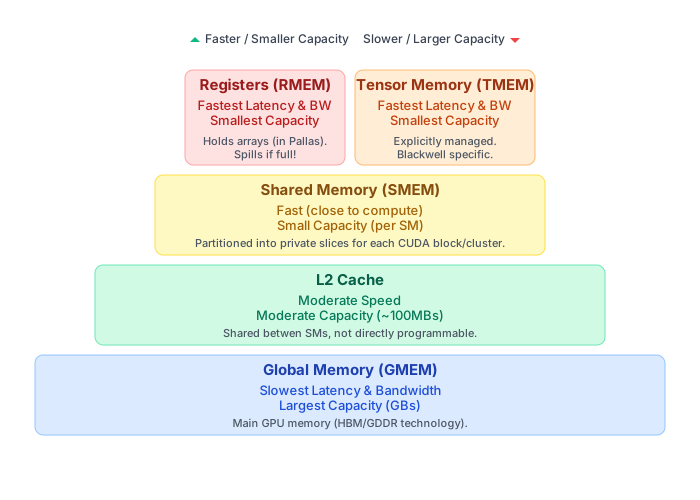
- 2CTA (CTA Pairs) and Cluster Cooperation: Blackwell PTX model allows two CTAs to execute tensor core instructions that access each other’s TMEM. This allows higher matrix operations efficiency.
- New optimized data types: FP8, FP6, and FP4 data types have the highest FLOPs and memory bandwidth utilization.
Software Stack
Ubuntu (24.04) with CUDA 13.0/12.8 toolkit with the latest NVIDIA driver versions (580) can be selected during provisioning the VMs. Docker and NVIDIA container toolkit can also be installed when configuring the deployment of the VM:
docker run --rm --gpus all --pull=always ubuntu nvidia-smi
The CUDA environment is complete, already including system NCCL. Test it with the following command:
sudo apt install -y openmpi-bin libopenmpi-dev
MPI_HOME=/usr/lib/x86_64-linux-gnu/openmpi
git clone https://github.com/NVIDIA/nccl-tests.git /home/ubuntu/nccl-tests
cd /home/ubuntu/nccl-tests
make MPI=1 MPI_HOME=$MPI_HOME -j$(nproc)
OMPI_ALLOW_RUN_AS_ROOT=1 OMPI_ALLOW_RUN_AS_ROOT_CONFIRM=1 mpirun -np 4 all_reduce_perf -b 512M -e 8G -f 2 -g 1
As of (16-12-2025), the current torch stable version torch==2.9.1+cu130 points to a Triton version which PTXAS is not compiled for SM103 compute capabilities (B300). Thus, a venv is provided with a solution. (See Annex I). Nonetheless, we have tested that Torch nightly version ( 2.11.0.dev20251215+cu130 ) seems to fix the issue. Install it with:
pip3 install --pre torch --index-url https://download.pytorch.org/whl/nightly/cu130
Profiling
Compared to other cloud providers, we allow querying GPU HW counters with NVIDIA profilers like ncu, Nsight systems, or other profilers that interact with CUPTI directly, such as native Triton profiler Proton. We also configure the VM to not require sudo access when doing profiling, which is a well-known issue within the community. The following setting is specified in /etc/modprobe.d/nvidia-profiling.conf:
options nvidia NVreg_RestrictProfilingToAdminUsers=0
This is again a fundamental requirement for highly technical teams doing both end-to-end performance work, such as accelerating training or inference, and low-level kernel benchmarking.
Annex I
PyTorch comes with a pre-compiled Triton bundle ( pytorch-triton package) for the Inductor codegen. We can bypass this limitation in the latest GPU architectures (e.g., B300), while the SW support is still experimental. We replace this pre-compiled Triton with one built from source with a given commit or nightly that we know can support the target GPU architecture. This is a workaround that SGLang has been using to have early support targeting GB300, for example.
If our Triton wheels do not contemplate SM103, this error is raised when compiling:
raise NoTritonConfigsError(
torch._inductor.runtime.triton_heuristics.NoTritonConfigsError: No valid triton configs. PTXASError: PTXAS error: Internal Triton PTX codegen error
`ptxas` stderr:
ptxas fatal   : Value 'sm_103a' is not defined for option 'gpu-name'bas
This script automates the creation of a Torch-compatible SM103 with the proper PTXAS location (Note TRITON_PTXAS_PATH var):
#!/bin/bash
# install uv
curl -LsSf https://astral.sh/uv/install.sh | sudo env UV_INSTALL_DIR=/usr/local/bin sh
uv --version
# create new .venv
uv venv torch --python 3.12
# patch ptxas baked into the en activattion
echo "export TRITON_PTXAS_PATH="$(which ptxas)"">> ~/torch/bin/activate
# Activate the venv
source ~/torch/bin/activate
# install torch
pip3 install torch torchvision --index-url https://download.pytorch.org/whl/cu130


